The AI Development & Knowledge Lifecycle diagram illustrates how artificial intelligence systems evolve through eight interconnected stages. From raw data collection to continuous retraining, it connects model development, human alignment, evaluation, and deployment. This editable circular infographic helps explain the complete process in PowerPoint and Google Slides presentations.
Diagram Preview
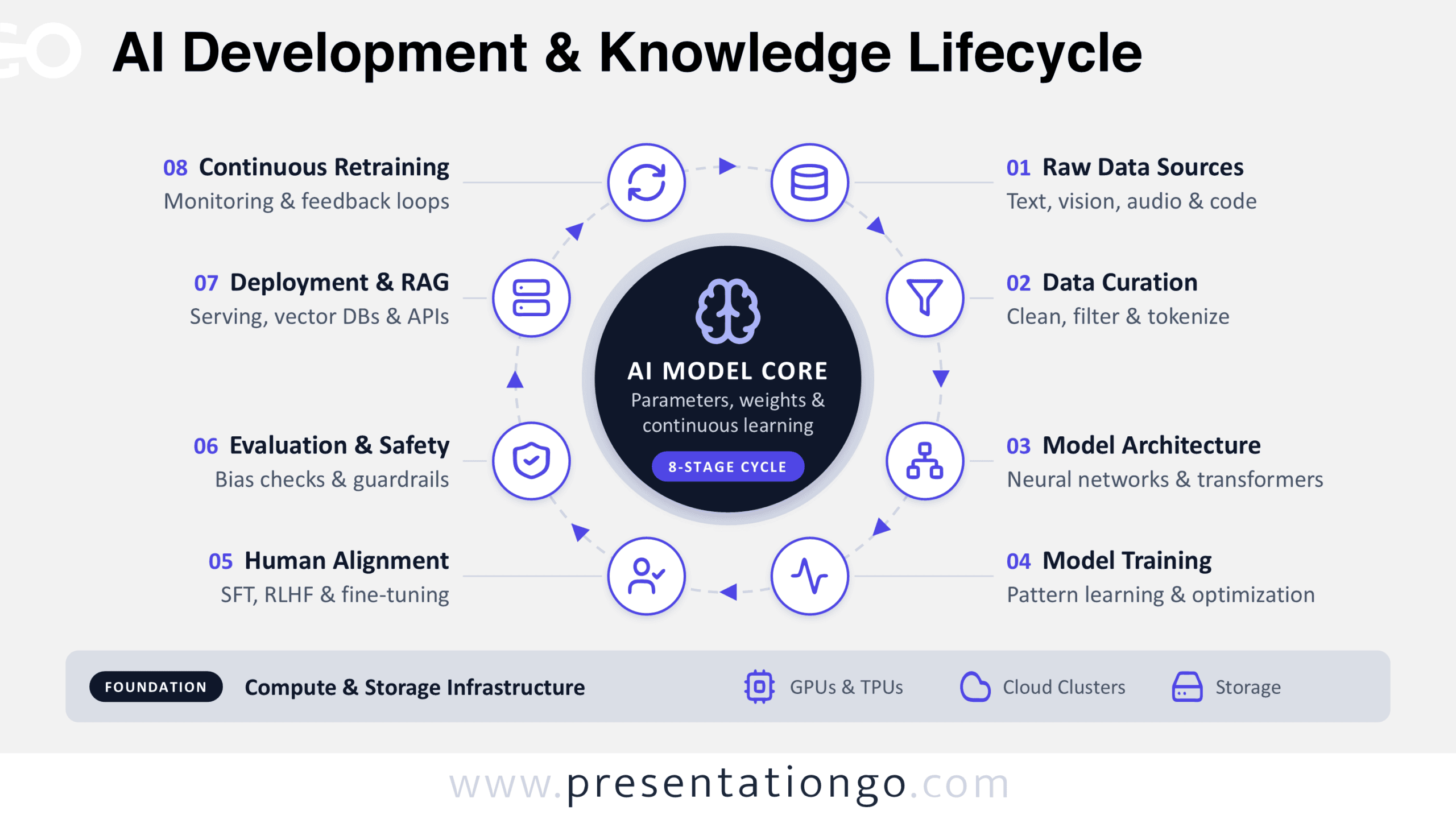
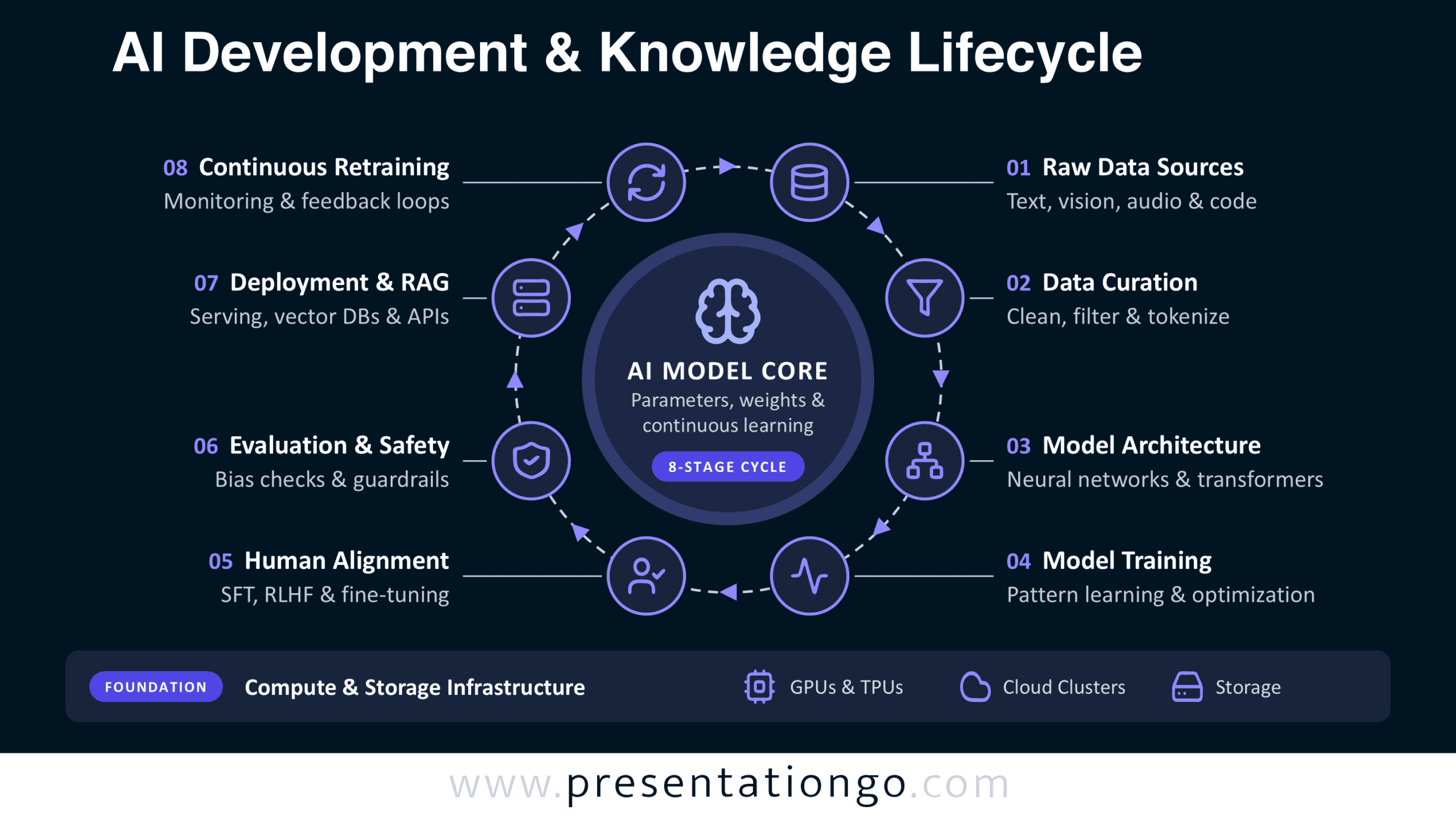
The diagram places an AI model core at the center of a continuous workflow. Eight numbered stages surround the model, while a separate foundation identifies the computing resources that support its operation. The preview shows the full lifecycle, with each stage connected to its corresponding activity.


Features and Customization Options
- Compatible with Microsoft PowerPoint and Google Slides — 16:9 widescreen
- Eight-stage circular AI development diagram
- Editable text, shapes, connectors, and flow arrows
- Customizable stages and icon placeholders
- Office library icons, easily modified or replaced
- Icons are shown for illustration purposes only
- Includes both light and dark background versions
Design and Structure
The composition follows a radial arrangement built around a prominent AI Model Core. A brain symbol anchors the central circle, accompanied by references to parameters, weights, and continuous learning. Eight smaller circular nodes form an outer ring connected by a dashed directional path. Each node contains a representative icon and connects to a numbered heading with supporting text. The sequence starts with Raw Data Sources and continues through Data Curation, Model Architecture, and Model Training. Human Alignment, Evaluation & Safety, Deployment & RAG, and Continuous Retraining complete the cycle.
The layout separates its main information into distinct visual levels. Large headings identify the stages, while shorter descriptions specify their technical activities. The arrows establish progression without dividing the workflow into disconnected sections. A horizontal foundation bar sits beneath the circular structure. It groups GPUs and TPUs, cloud clusters, and storage under Compute & Storage Infrastructure. This additional layer distinguishes the resources supporting AI development from the stages of the lifecycle itself.
Practical Applications
- Introduce machine learning students to the progression from raw datasets to deployed models.
- Explain how data teams clean, filter, and tokenize training material before model development.
- Map an LLM development pipeline that includes architecture selection, optimization, and fine-tuning.
- Present supervised fine-tuning and RLHF within an AI alignment workshop.
- Document evaluation checkpoints for bias testing, safety reviews, and model guardrails.
- Explain how deployed models connect to APIs, vector databases, and retrieval-augmented generation systems.
- Plan MLOps discussions around monitoring, feedback collection, and retraining activities.
- Identify infrastructure dependencies when presenting AI compute and storage requirements.
Summary
The AI Development & Knowledge Lifecycle diagram brings development stages, operational feedback, and infrastructure into one structured visual. Its circular arrangement emphasizes that AI improvement continues after deployment. Use this editable resource to communicate technical responsibilities, explain dependencies, or organize discussions about modern AI systems.