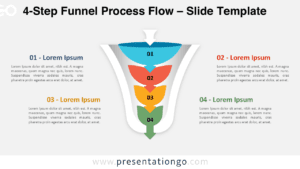
PowerPoint Funnel Chart With 4 Steps

Free PowerPoint funnel chart with 4 steps. Clean vertical funnel with fully editable layers. Curved arrows show the input on

PPTX

4:316:9

Editable 4-step funnel diagram for PowerPoint showing layered vertical process with input arrows and stage labels for conversion flow.
100% Free
  • No sign-up required
  • Unlimited downloads
  • Always free

Requires attribution — Terms · license without credit

PowerPoint
4:3 · PPTX · 45.7 KB
PowerPoint
16:9 · PPTX · 98.8 KB
Aspect ratio available: 4:3, 16:9

Free PowerPoint funnel chart with 4 steps. Clean vertical funnel with fully editable layers. Curved arrows show the input on the wider side of the funnel. You can briefly describe each stage via the text placeholders on the right of the funnel.

How to customize the editable PowerPoint Funnel Chart?

  • Select the funnel / shape
  • Right-click
  • Group>Ungroup
  • Then you can select and edit all the parts of the PPT funnel

This ‘Funnel Chart With 4 Steps’ template features:

  • 1 unique slide
  • Light layout
  • Ready to use template with text placeholders
  • Completely editable shapes
  • Standard (4:3) and Widescreen (16:9) aspect ratios
  • PPTX file (PowerPoint)

Free font used:

  • Calibri (System Font)

Terms of use

Free to use, with one condition

This template is free for personal, educational, and commercial work — as long as you credit PresentationGO.

Tap any item below for the full details ↓

Keep the "Design by PresentationGO" credit on your title or closing slide, or add a visible link to presentationgo.com if you remove it.

Use it freely for school, personal projects, and non-commercial presentations.

Use it in client work, pitches, and internal business presentations.

You can't resell the template itself or republish it on another template site, edited or not.