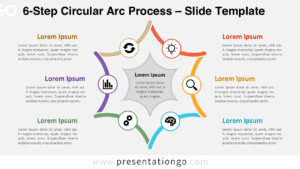
The 6-Step Boomerang Diagram presents a circular process format with six curved arrow elements that guide viewers through sequential stages, designed specifically for PowerPoint and Google Slides presentations.
Showcase Six Interconnected Steps in a Circular Flow
This diagram features six boomerang-shaped elements arranged in a circular flow, each rotated at a 60° angle to form a harmonious, clockwise loop. The curved, V-shaped arrows visually guide the viewer’s eye from one segment to the next, emphasizing motion and progression. At the center of each arrow, a distinct icon enhances clarity, while a bold title and short text block accompany each step, alternating neatly around the circle. The symmetry and consistent spacing give this diagram a well-organized, clean appearance.
Circular diagrams are ideal for communicating processes that cycle or repeat. This 6-step layout is perfect for showcasing iterative strategies, development phases, or recurring workflows. For instance, a marketing team might use this to map out an annual campaign cycle, while a product team could outline stages of iterative design. Each step is both visually distinct and part of the whole, making complex concepts easy to follow.
The template includes two fully editable slides with pre-set icons and text placeholders. It offers both light and dark themes and is designed for 4:3 and 16:9 formats. Whether you’re using PowerPoint or Google Slides, the customizable shapes allow easy updates to match your branding or messaging.
Download this versatile 6-step circular diagram to transform complex processes into clear, engaging visual narratives for your next presentation.
Widescreen (16:9) size preview:


This template offers:
- 2 unique slides
- Options for both light and dark themes
- Pre-populated with icons and text placeholders
- Fully customizable shapes for complete control
- Available in both Standard (4:3) and Widescreen (16:9) ratios
- Offered in both PowerPoint PPTX and Google Slides formats