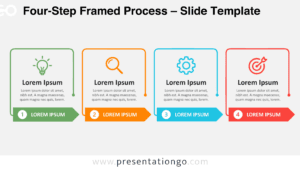
The Four-Step Vertical Cards diagram is a free infographic for PowerPoint and Google Slides. It organizes four stages into separate vertical panels, each combining a numbered marker, an icon, and descriptive text. Use this layout to explain processes, structure workflows, or present four related concepts in a consistent format.
Diagram Preview
The preview shows the complete four-card arrangement in two background versions. Both use the same layout, making it easy to choose a suitable presentation style without changing the content structure.


Features and Customization Options
- Compatible with PowerPoint and Google Slides — 16:9 widescreen
- Four-step process diagram with editable vertical cards
- Editable text, shapes, and icon placeholders
- Four icons from the Office library, included for illustration purposes only and easily modifiable
- Adjust card labels, descriptions, and numbered markers
- 100% editable vector shapes that retain quality when resized
- Includes both light and dark background versions
Design and Structure
The diagram arranges four tall, rounded rectangular cards in a single horizontal row. Equal card dimensions and consistent spacing create a balanced composition. Each card starts with a compact upper section containing a centered icon. A V-shaped divider connects this area to the main content panel below. A numbered circular marker sits within the divider, establishing a distinct focal point for each stage. The numbers progress from one to four across the layout.
Below each marker, a prominent heading introduces the stage, followed by a multiline description area. Centered text alignment maintains visual consistency across all four cards. The generous vertical proportions accommodate explanations without changing the overall arrangement. Each card also stands independently, allowing viewers to examine individual stages while following the complete sequence. The rounded corners soften the geometric structure, while repeated spacing and typography establish a recognizable visual rhythm.
Practical Applications
- Map a product launch through research, development, testing, and release.
- Present a recruitment process covering application, screening, interviews, and onboarding.
- Outline a marketing campaign from audience research to performance evaluation.
- Break down a training program into preparation, instruction, practice, and assessment.
- Explain a customer onboarding journey through registration, setup, activation, and support.
- Organize a quarterly action plan around four measurable business priorities.
- Compare four strategic initiatives using a shared information structure.
Summary
Four-Step Vertical Cards combines numbered stages, dedicated icon areas, and structured text panels in one reusable infographic. Its consistent arrangement supports sequential explanations and side-by-side comparisons. Download the diagram for PowerPoint or Google Slides and adapt the four sections to your presentation topic.