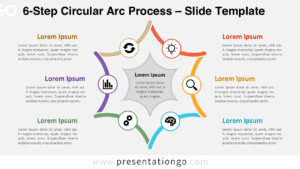
The Hexagon Cycle Circles template features six steps in a hexagon formation, visually representing a cyclical process for use in PowerPoint and Google Slides.
A Six-Step Approach to Visualizing Processes
This dynamic diagram features six circles arranged in a hexagonal shape. Each circle contains a colorful triangular corner that, when extrapolated, forms a full hexagon. The cycle process layout highlights the connection between the outer components and a central idea. This design enables a smooth flow of concepts. The triangular shapes inside the circles further reinforce their interconnected nature. Icons and text placeholders enhance clarity and cohesion in any presentation.
Cycle process diagrams, or radial cycle diagrams, show how elements interact within a continuous loop. They are ideal for illustrating processes, workflows, or recurring tasks. The Hexagon Cycle Circles diagram is perfect for presenting six interrelated ideas that center around one concept. Its customizable shapes and icons make it versatile for various contexts. It works well in business strategies, educational modules, or creative brainstorming sessions. For instance, it can visually explain how six departments contribute to a company’s mission or how six steps form a product development lifecycle.
This template includes two unique slides with editable icons and text placeholders. The fully customizable shapes provide flexibility. It comes in both light and dark themes. You can choose between standard (4:3) and widescreen (16:9) layouts. Compatible with PowerPoint PPTX and Google Slides, the template is easy to use across different platforms.
Download the Hexagon Cycle Circles diagram today to showcase your six-step process with clear, interconnected visuals.
Widescreen (16:9) size preview:


This template offers:
- 2 unique slides
- Options for both light and dark themes
- Pre-populated with icons and text placeholders
- Fully customizable shapes for complete control
- Available in both Standard (4:3) and Widescreen (16:9) ratios
- Offered in both PowerPoint PPTX and Google Slides formats