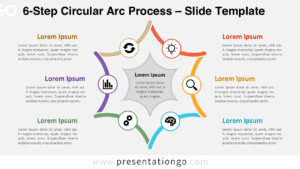
The 6-Option Circular Insight Hub is an editable PowerPoint and Google Slides diagram built to organize six supporting ideas around one central topic. It gives each point its own content area while preserving a strong relationship with the main subject.
Diagram Preview
The preview presents six surrounding sections arranged in three horizontal levels around a large central circle. Each section contains a heading, supporting text, and an icon placeholder, creating a consistent structure across all six options.


Features and Customization Options
- Compatible with Microsoft PowerPoint and Google Slides
- 6-option circular diagram, fully editable
- Editable text, shapes, and icon placeholders
- 100% editable vector shapes — no quality loss when resized
- Icons shown are for illustration purposes only
- Icons come from the Office library and are easily modifiable
Design and Structure
The diagram places a large circular focal area at the center, with three content panels extending from each side. Curved connectors merge the six surrounding sections into the central hub, reinforcing the relationship between individual topics and the core message. The mirrored arrangement keeps both sides visually balanced while accommodating more information than the four-option version.
Each outer panel provides a defined heading area and a compact text zone for supporting details. Separate circular icon placeholders sit outside the main content blocks, creating another visual layer without crowding the written information. The repeated panel shape establishes a steady reading rhythm from top to bottom.
Practical Applications
- Map six strategic priorities to one organizational objective
- Present six departments contributing to a shared company initiative
- Outline six customer journey touchpoints around one experience goal
- Summarize six project workstreams within a larger program
- Explain six product capabilities supporting one value proposition
- Organize six research findings around a central conclusion
- Present six performance factors connected to one business outcome
Summary
The 6-Option Circular Insight Hub offers a structured format for presentations that need six distinct ideas tied to one central theme. Its editable layout, repeated content panels, and modifiable icon placeholders support detailed comparisons and multi-part business frameworks without relying on a linear sequence.