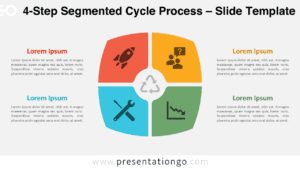
The 4-Option Circular Insight Hub is an editable diagram for PowerPoint and Google Slides that organizes four supporting ideas around one central message. Its balanced structure helps presenters show relationships between a core subject and four distinct points without turning the slide into a linear sequence.
Diagram Preview
The preview shows four rounded content panels positioned around a central circular area. Each panel combines a heading, supporting text, and an icon placeholder, while curved segments visually connect the surrounding sections to the middle.


Features and Customization Options
- Compatible with Microsoft PowerPoint and Google Slides
- 4-option circular diagram, fully editable
- Editable text, shapes, and icon placeholders
- 100% editable vector shapes — no quality loss when resized
- Icons shown are for illustration purposes only
- Icons come from the Office library and are easily modifiable
- Includes both light and dark background versions
Design and Structure
The layout uses a central circle as the visual anchor, with four large rounded panels arranged symmetrically around it. Each surrounding section points inward through a curved segment, creating a consistent connection between the outer content and the main subject. The repeated geometry gives all four options equal visual weight.
Each panel provides a dedicated heading area, a short text block, and a circular icon placeholder positioned near the outer edge. This separation keeps supporting information distinct while preserving a unified composition. The open spacing between sections helps viewers identify each option before returning their attention to the central statement.
Practical Applications
- Summarize four strategic priorities around one company objective
- Present four departments contributing to a shared initiative
- Compare four service areas linked to one customer need
- Map four project workstreams to a central program goal
- Explain four product benefits connected to a core value proposition
- Outline four research findings supporting one conclusion
Summary
The 4-Option Circular Insight Hub provides a compact way to connect four independent points to one shared topic. Its editable structure, dedicated text areas, and modifiable icon placeholders make it suitable for business, project, marketing, and educational presentations that need a balanced four-part overview.