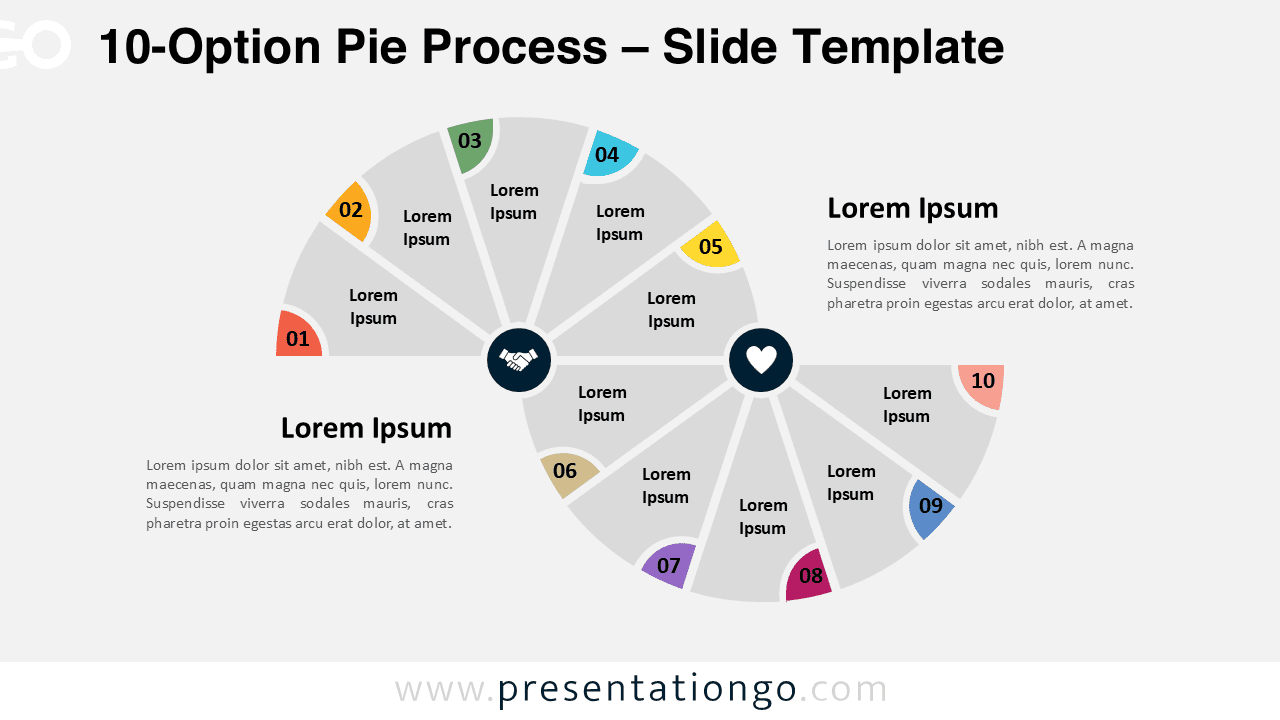
The 10-Option Pie Process diagram showcases a fluid 10-step process through two interconnected semi pie charts designed specifically for PowerPoint and Google Slides presentations.
Ten-Part Diagram for Visualizing Strategic Steps
This diagram showcases a horizontal sequence using two semi pie charts—one on the top left and the other on the bottom right. The segments flow like a serpentine path, enhancing clarity and orientation. Each of the ten stages is distinctly numbered, complemented by icon placeholders and editable text boxes. The alternating direction emphasizes contrast between steps, while the symmetrical design provides a harmonious structure. Furthermore, its alternating pattern helps draw attention to individual steps, making it easy to differentiate contrasting or comparable processes.
Process diagrams like this are essential for breaking down complex tasks into manageable steps. This specific layout is ideal for showcasing workflows, business strategies, or contrasting operations. For example, a company might use this to illustrate product development phases where research and execution alternate. Likewise, educators may use it to compare opposing teaching methodologies. The clear sequence ensures that each concept is well-defined, while the alternating flow naturally guides the viewer’s eye. Additionally, it supports discussions where alternating perspectives or comparisons are central to the message.
This presentation template includes two unique slides pre-populated with numbered sections, icons, and editable text fields. It’s designed to be fully customizable, allowing users to easily modify shapes, colors, and content. Available in both light and dark themes, the layout comes in Standard (4:3) and Widescreen (16:9) formats. Moreover, it works seamlessly with both PowerPoint (PPTX) and Google Slides, offering flexibility for a range of users.
Download this 10-step alternating process to visualize a complete sequence or comparison across ten clearly defined parts.
Widescreen (16:9) size preview:


This template offers:
- 2 unique slides
- Options for both light and dark themes
- Pre-populated with numbers, icons, and text placeholders
- Fully customizable shapes for complete control
- Available in both Standard (4:3) and Widescreen (16:9) ratios
- Offered in both PowerPoint PPTX and Google Slides formats
The complete Pie Process collection: