The Central Contrast Comparison is a two-part diagram designed for PowerPoint and Google Slides to compare opposite ideas side by side.
Compare Opposites and Contrast with Visual Balance
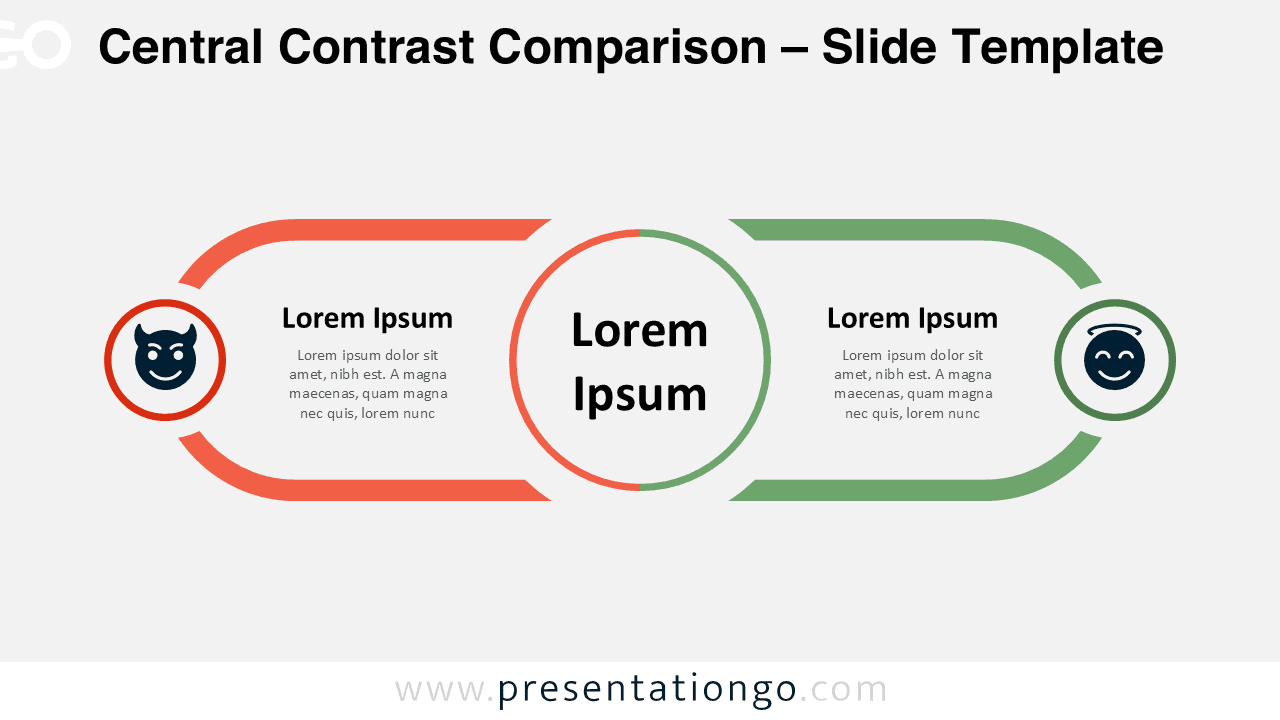
This slide layout features a symmetrical design that places a large central circle between two mirrored sections. Each side includes an icon encased in a circular frame, a headline area, and a block of text beneath. The central circle acts as the core idea, connecting both elements visually. Color-coded borders provide contrast and help separate the two sections clearly. The pre-built placeholders for text and icons simplify editing and allow users to quickly highlight differences or oppositions while maintaining a unified design.
Diagrams that highlight contrasting ideas are often used to demonstrate opposing viewpoints, dual strategies, or binary decisions. This specific template is ideal for showcasing any kind of dichotomy—such as pros and cons, ethical debates, strength vs. weakness, or different approaches to the same challenge. For instance, it can effectively support a presentation on moral dilemmas, risk assessments, or marketing comparisons. The circular visual reinforces the idea of balance, while the mirrored layout helps the audience grasp both perspectives at a glance.
This Central Contrast Comparison template contains two unique slides: one with a light background and one with a dark theme. Each slide includes pre-filled icons and text placeholders for easy adaptation. The elements are fully editable, including colors, shapes, and positions. It is available in both Standard (4:3) and Widescreen (16:9) formats and works seamlessly in PowerPoint (PPTX) and Google Slides.
Download this two-part contrast diagram to compare key opposites or perspectives clearly and effectively in your next presentation.
Widescreen (16:9) size preview:



This template offers:
- 2 unique slides
- Options for both light and dark themes
- Pre-populated with icons and text placeholders
- Fully customizable shapes for complete control
- Available in both Standard (4:3) and Widescreen (16:9) ratios
- Offered in both PowerPoint PPTX and Google Slides formats