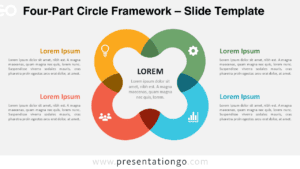
Free 4-part PowerPoint diagram. A cycle diagram with 8-design (infinity) shapes. Great for any business concept with 4 options or matrices like the SWOT analysis model. Ready-to-use template with numbers and text placeholders.
4-Part Diagram
This free 4-part PowerPoint diagram is the epitome of a versatile template! Indeed, you can use it for your matrices, your lists of ideas or information, your business analysis tools (such as the SWOT Analysis), and your cycle processes. This colorful and modern slide displays a squared figure. Each side of it is made up of an 8-design or infinity symbol shape. Besides, the 4 nodes consist of white circles in which you can include numbers, icons, titles, and text.
You can use this original design, which also reminds us of a bicycle chain, for a wide number of infographics. Indeed, your SWOT matrix, 4-step cycle processes, or equal part charts will fit perfectly inside this free 4-part PowerPoint diagram template.
Shapes are 100% editable: colors and sizes can be easily changed.
This ‘4-Part Diagram ‘ template features:
- 1 unique slide
- Light layout
- Ready to use template with text placeholders
- Completely editable shapes
- Standard (4:3) and Widescreen (16:9) aspect ratios
- PPTX file (PowerPoint)
Free font used:
- Calibri (System Font)