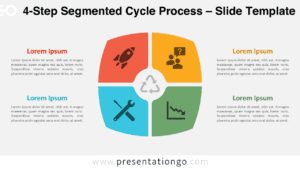
The Four-Step Radial Star Chevron, a captivating process diagram for PowerPoint and Google Slides, features a central circular hub with four distinctively colored chevron arrows pointing inwards, creating a visually striking four-point star.
Organize Your Process with This 4-Step Star Chevron
Radial process diagrams effectively convey step-by-step procedures or workflows, guiding the audience through a logical sequence. This four-step diagram template showcases a unique design with chevron arrows radiating from a central hub, each accompanied by an icon and text placeholder for detailed descriptions. The numbered arrows establish a clear progression, while the varied colors enhance visual distinction.
This diagram is particularly well-suited for presentations that outline strategic plans, project methodologies, or instructional content. For instance, a marketing professional could leverage it to illustrate the four stages of a product launch campaign, while a consultant might use it to explain their four-pillar approach to organizational transformation. Moreover, the template’s visual appeal and organizational clarity make it an excellent choice for training sessions, workshops, or educational seminars that necessitate a step-by-step breakdown of complex processes.
The presentation document includes 2 unique slides, pre-populated with icons, numbers, and text placeholders for convenient customization. Users have complete control over the fully customizable shapes, enabling them to tailor the design to their specific needs. Additionally, the template offers options for both light and dark themes, ensuring seamless integration with various presentation styles. Available in both Standard (4:3) and Widescreen (16:9) ratios, as well as PowerPoint PPTX and Google Slides formats, this template caters to a wide range of presentation requirements.
Download the Four-Step Radial Star Chevron template to enhance your next presentation with a clear and organized visual aid.
Widescreen (16:9) size preview:


This template offers:
- 2 unique slides
- Options for both light and dark themes
- Pre-populated with icons, numbers, and text placeholders
- Fully customizable shapes for complete control
- Available in both Standard (4:3) and Widescreen (16:9) ratios
- Offered in both PowerPoint PPTX and Google Slides formats