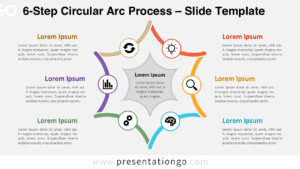
The HexaFlow Cycle Diagram presents a six-step cyclical process through interconnected hexagonal segments with numbered progression markers, designed for PowerPoint and Google Slides presentations.
Six-Step Hexagonal Process Flow with Numbered Progression
This diagram showcases a hexagonal ring structure made of six interconnected segments arranged in a perfect circle. Each segment is a hexagon tile that contains a bold icon, a title, and a numbered tab (1 to 6), guiding viewers through a logical clockwise sequence. Subtle chevron shadows lend directionality, while the negative space in the center emphasizes symmetry. On both sides of the main ring, aligned text boxes offer ample space to describe each stage, maintaining a balanced and legible layout throughout.
Cycle diagrams are a powerful way to visualize ongoing processes, feedback loops, and systems that require circular thinking. Radial diagrams, on the other hand, help center concepts around a core theme. This template bridges both functions, ideal for scenarios like product lifecycles, team workflows, continuous improvement models, or KPI monitoring. For instance, a marketing strategist might use each tile to represent the phases of campaign execution, while an educator could present key curriculum stages in a learning cycle.
The template includes two pre-designed slides, already populated with editable icons and text placeholders. Every shape can be customized to fit branding or thematic needs, with optional light and dark background themes. It is available in both standard (4:3) and widescreen (16:9) formats and works seamlessly in PowerPoint (PPTX) and Google Slides.
Download this free 6-step diagram to present your process with clarity and direction.
Widescreen (16:9) size preview:


This template offers:
- 2 unique slides
- Options for both light and dark themes
- Pre-populated with icons and text placeholders
- Fully customizable shapes for complete control
- Available in both Standard (4:3) and Widescreen (16:9) ratios
- Offered in both PowerPoint PPTX and Google Slides formats