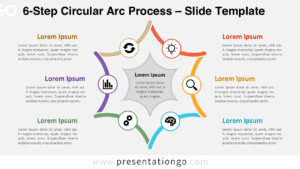
The Six-Spoke Radial Diagram presents a symmetrical framework for organizing six interconnected components around a central concept, designed specifically for PowerPoint and Google Slides presentations.
Visualizing Central Ideas and Their Six Key Elements
This diagram showcases a sophisticated semicircular design featuring six curved, tapering arms that extend outward from a central black hub. Each arm forms an elegant arc that connects to rectangular segments, creating a balanced petal-like structure. The central circle serves as the focal anchor, containing space for icons and titles that establish the core theme. Six external text blocks surround the main structure in perfect symmetry—three positioned on each side—maintaining equal spacing throughout. The curved lines and clean segmentation create an intuitive visual flow that guides viewers naturally from the center to the surrounding elements.
This radial framework excels in presenting cyclical processes, strategic frameworks, and multi-faceted business models. Marketing teams use it to showcase the six pillars of brand strategy, while project managers demonstrate workflow phases or team responsibilities. The template proves invaluable for illustrating product development cycles, sustainability principles, or service offerings where each component contributes equally to the central concept. The symmetrical layout ensures balanced emphasis across all elements, making it particularly effective for stakeholder presentations where each spoke represents different departments or strategic initiatives.
The template includes 2 unique slides pre-populated with customizable icons and text placeholders. Users can fully customize all shapes, colors, and content to match their brand requirements. Both light and dark theme options accommodate different presentation environments and corporate styles. The template supports Standard 4:3 and Widescreen 16:9 formats, ensuring compatibility across various display setups. Complete compatibility with both PowerPoint PPTX files and Google Slides provides flexibility for teams using different platforms.
Download this comprehensive template to effectively communicate six interconnected elements or process steps in your next presentation.
Widescreen (16:9) size preview:


This template offers:
- 2 unique slides
- Options for both light and dark themes
- Pre-populated with icon and text placeholders
- Fully customizable shapes for complete control
- Available in both Standard (4:3) and Widescreen (16:9) ratios
- Offered in both PowerPoint PPTX and Google Slides formats
The complete Spoke Radial Diagram collection: